 |
|

The TMS that processes import and export dossiers without Excel or double entry.
Increase throughput and eliminate operational bottlenecks.
From real-time KPI monitoring to AI in logistics. Give the logistics manager full control.
Intelligent Document Processing
Stop entering data manually.
Start automating intelligently.
Portofx brings your entire back-office together in one platform. Less manual work through automation, more control and a clear overview of every shipment, with AI that automatically reads documents and fills in dossiers.
Export Automation Flow
Maximise your export capacity. No more manual data entry; our AI-powered OCR software reads booking confirmations directly and fills dossiers, minimising manual work.
Our AI monitors emails, automatically reads attachments from incoming messages and creates dossiers directly or seamlessly updates existing ones.
Import Operational Stream
Increase the processing speed of Bills of Lading and customs clearance documents. Our import module is designed for high-volume operations where every minute counts.
Experience automated processing of incoming mail logistics. Every Bill of Lading can be automatically read via AI, analysed and directly converted into complete import dossiers.
STABLE

Familiar bottlenecks in your logistics operation
Many freight forwarders and importers face the same operational challenges every day. Not due to a lack of knowledge, but because of tools not built for logistics.
Deadlines you spot too late
Customs declarations, cut-offs and ETA changes arrive scattered across emails. By the time someone sees it, it is often too late.
Margins you only know weeks later
Costs per dossier are spread across loose invoices and spreadsheets. You only find out if a shipment was profitable at month-end.
Customers calling for a status no one can provide
Information is with one colleague, in one inbox or in one file. When that person is absent, the entire dossier is blocked.
Portofx versus paper and Excel
No theory. A direct comparison on the six things your team deals with every day.
| On paper | Excel and loose tools | Portofx | |
|---|---|---|---|
| Creating a dossier | Folders, printouts, handwritten notes | Copy a new file, fill in fields manually | AI automatically fills the dossier from incoming documents |
| Tracking status | Walk around, ask, guess | Email or call colleagues | Real-time overview in one dashboard |
| Costs and margins | Only visible when the invoice is on the table | Only visible at month-end closing | Visible per dossier during execution |
| Finding documents | Search through filing cabinets and binders | Search in mailbox and shared folders | Automatically linked to the correct dossier |
| Onboarding a new employee | Months of shadowing | Weeks | Days, in a familiar Microsoft environment |
| Risk when someone is sick or leaves | Knowledge disappears with the person | Files stored locally or with one colleague | Everything centralised and accessible for the whole team |
The Portofx Platform
Bring order to the chaos with a unified, intelligent ecosystem designed for high-volume forwarding.
Dossier management software
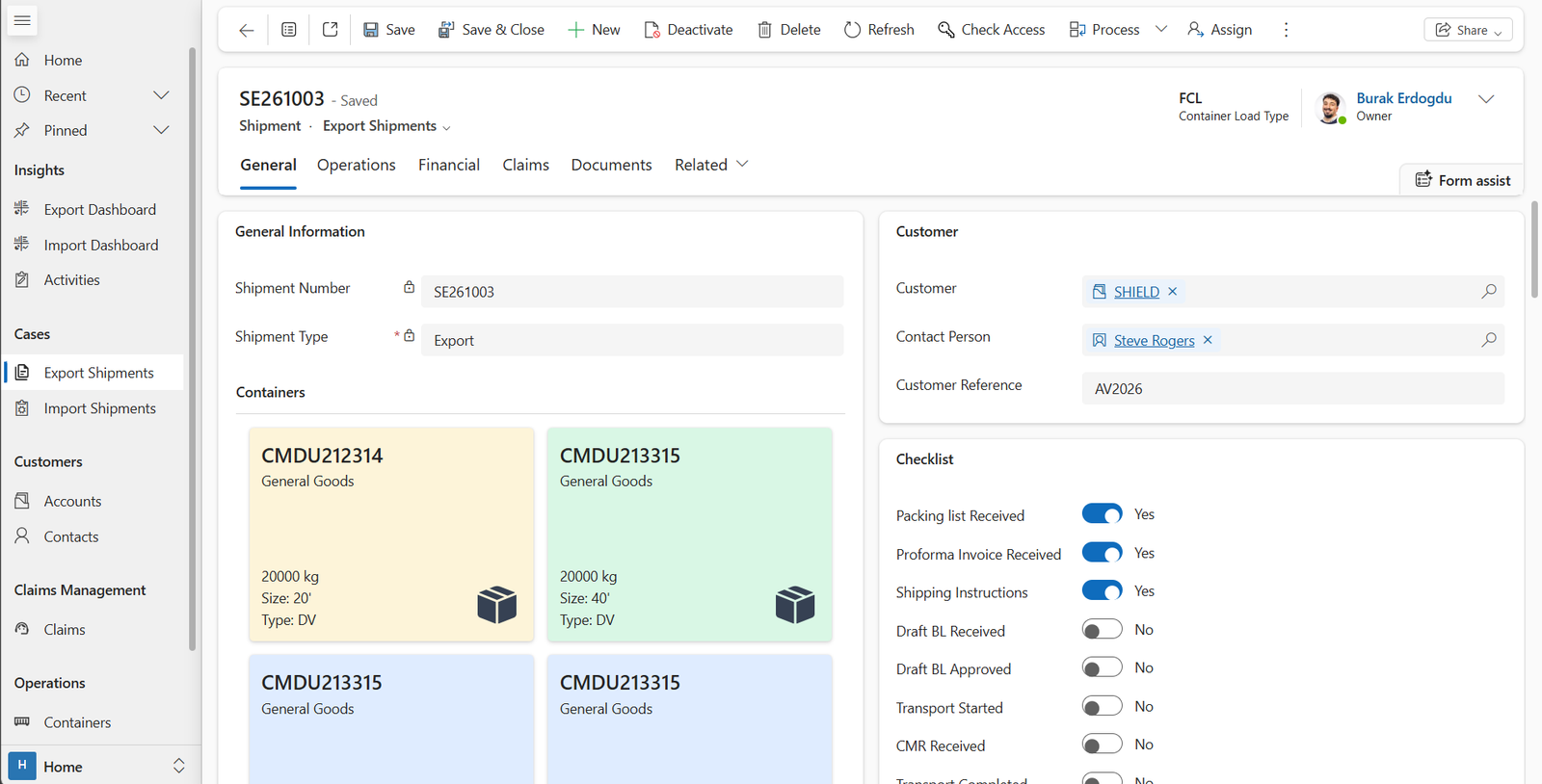
Manage all export dossiers in one central system built for forwarding and logistics teams. Gain full visibility, reduce manual work and keep control over every shipment.
Transport & Ocean freight tracking
Track transport orders, shipments and ETAs in real time within one integrated platform. Improve planning accuracy and eliminate fragmented communication across tools.
AI-powered document processing for your logistics workflow
AI recognises and processes data from your documents and converts it directly into structured data within Portofx. Less manual work, faster turnaround times and more control.



Built on the Microsoft stack your IT already manages
Built for real logistics operations
Portofx runs on Microsoft Power Platform, the same technology your IT department already works with. That means no separate login, no extra training on an unfamiliar interface, and no vendor lock-in. Your data stays in your own Microsoft tenant, hosted within the EU.
For your team, Portofx feels like a natural extension of Outlook, Teams and SharePoint. For your IT, it means governance, security and compliance they already know. Implementation takes weeks, not months.
Frequently asked questions
The questions you ask before you decide. Answered honestly.
Excel works as loose files without a central source of truth. With Portofx, every dossier gets one structured environment where all documents, status updates and communication are automatically linked. No duplicate versions, no searching through folders.
Onboarding per employee: less than 1 day. Full implementation for an average freight forwarder: 4 to 6 weeks. You remain operational during the transition, no downtime.
Yes. The platform supports full import and export dossiers, from local runs to intercontinental ocean freight. All shipment types receive the same structured follow-up.
Portofx is built on Microsoft Power Platform and integrates natively with Dynamics 365, SharePoint and Azure. For legacy systems or external partners we use API connections. Discuss your specific stack during the demo.
Every dossier gets full logging: who changed what and when. Documents are automatically archived according to statutory retention periods. During an audit you export the complete dossier including audit trail in one click.
No. Every dossier has an owner, but the entire team sees the same real-time status. Priorities and open actions remain visible in the dashboard. Nobody is a bottleneck.
On average 60% less time on follow-up. No typing status emails, no searching for documents, no double work between systems. Creating an export dossier takes less than 2 minutes, from zero to fully completed.
Portofx offers three plans. App: €39 per user per month, excluding implementation costs, including dossier management, document management, cost & invoicing, Power Platform and Microsoft Outlook integration. App + Service: on request, including dedicated implementation guidance, support, personal account manager and access to the support portal. Group 10+: on request with a volume discount for teams of 10 or more users. No hidden fees or transaction charges.